How to Start a Successful Blog: Simple Steps for Beginners
.webp)
Are you thinking of starting a blog? It feels exciting. But at the same time, your mind probably fills with questions. Is blogging dead? Is it worth my time? How long does it take to make money? Do I need special skills?
I had the same doubts when I started. And TBH, blogging isn’t dead. But the way it works has changed, and it’s not what most online gurus make it sound like. If you’re looking for a quick get-rich scheme, this definitely isn’t for you.
Blogging rewards patience more than hype now. This guide is for complete beginners who want clarity. No fluff. Just practical guidance you can actually follow.
“Some links in this post are affiliate links, meaning we earn a small commission if you make a purchase. This doesn't cost you anything extra. We only recommend products we actually trust and use ourselves.”
Key Takeaways
- Know how to pick the best niche for your blog.
- A step-by-step beginner-friendly guide to set up your blog website.
- Discover which traffic sources bring real visitors.
- Understand realistic timelines so you know what to expect.
- Learn the best ways to monetize your blog. Understand how most bloggers earn with the right strategy and patience.
- Know and avoid the common mistakes that make most bloggers quit too early.
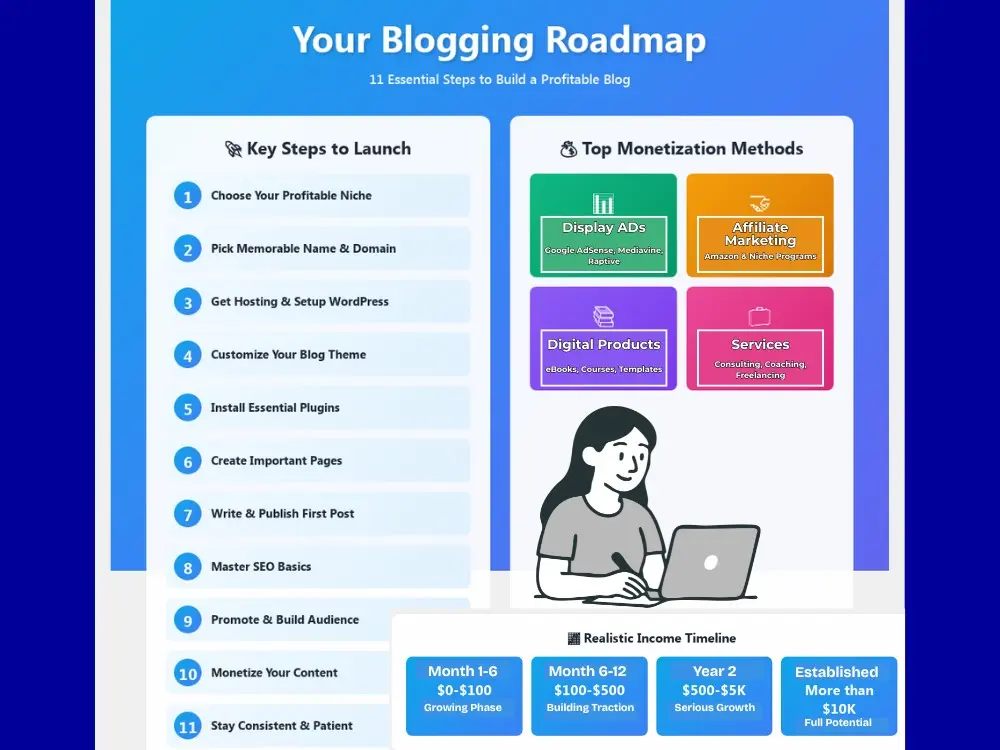
Important Note: The income potential in the above image is based on multiple research data and is not guaranteed. Your real earnings may vary based on several factors like time, skill, monetization strategy, and many other factors.
Step 1: Choose Your Blog Niche
A niche is simply what your blog is about and who you're writing for. Your blog feels all over the place without a niche. With one, it has a clear purpose.
Why It Matters
Your niche clearly conveys to readers how it matters to them. A common mistake people make is covering everything, like mixing up several niches like finance, travel, tech, etc. You must avoid this mistake and focus on one clear category.
How to Choose a Profitable Niche
Think of three things:
- You should have a genuine interest in the niche you choose (so you don't quit after three months).
- A topic you know about or want to learn deeply.
- Something people are actually searching for and spending money on.
Research Competition Properly
Competition scares beginners, but it actually signals demand. Monetization becomes difficult if no one writes about a topic. So, spend some time studying top blogs and find what they're missing. That's your opening.
Niche Validation Checklist
Ask yourself:
- Can I realistically write 100+ posts on this niche?
- Do people really search for this content?
- Can I monetize through ads, affiliates, products, or services?
Profitable Niche Examples for 2026 and Beyond
| Pinterest-Friendly Niches | SEO-Friendly Niches |
|---|---|
| Home decor and DIY projects | Personal finance for specific groups |
| Recipe and meal planning | AI tools for small businesses |
| Fashion and outfit ideas | Remote work and freelancing guides |
| Wedding planning tips | Software tutorials and comparisons |
| Parenting hacks and activities | Health and fitness for specific ages |
| Craft tutorials | Legal or tax advice for beginners |
| Gardening | Product reviews and buying guides |
Step 2: Pick a Memorable Blog Name and Domain
Your blog name sets the first impression. It doesn’t need to be perfect, but it needs to be clear.
What Makes a Good Blog Name
Strong blog names feel easy and intentional. Aim for:
- Easy spelling and pronunciation.
- Related to your niche but not so narrow you can't expand later
- Availability as a .com domain.
Where to Check Domain Availability
You can check them on domain registrars like Namecheap or your hosting provider. Stuck on ideas? Our domain name generator helps spark ideas when creativity stalls.
Personal Name vs Brand Name
Using your own name works great if you want to build personal authority. A brand name works better if you might sell the blog down the road or bring on other writers. Either way, good content matters more than the name itself.
Quick Naming Tips
- Keep it short. Two to three words max or within 8-15 characters (the shorter the better).
- Skip numbers and hyphens (they're hard to remember and awkward to say).
- If people need you to explain it twice, pick something simpler.
Step 3: Get Web Hosting and Set Up Your Blog
Web hosting is a place where your website files are stored. It makes your site visible online. Your blog doesn’t exist without hosting.
Why Hosting Matters
Your hosting choice affects everything:
- How fast your pages load.
- Whether your site stays online consistently.
- How secure your blog is from hackers.
- The overall experience your readers get.
Choose your hosting provider carefully. A poor choice can slow down your site or cause constant headaches once you're up and running.
Recommended Hosting for Beginners
I personally use both Hostinger and Bluehost for different sites. Both work great for beginners. They offer different plans from shared hosting to virtual private servers (VPS). We use Hostinger's VPS for Smart Tools AI and have zero complaints. But if you're just starting out, shared hosting is more than enough.
Hostinger
- Extremely affordable without sacrificing quality.
- Fast loading speeds even on basic plans.
- Clean, easy-to-use control panel.
- Great customer support via chat.
- Free domain and SSL included.
- One-click WordPress install.
Get Hostinger with 20% extra discount exclusively through our link and start your blog for less than the cost of a coffee per month.
Bluehost
- Officially recommended by WordPress.
- Reliable uptime and solid performance.
- Beginner-friendly dashboard.
- Strong customer support when you need help.
- Free domain for the first year.
- Free SSL certificate and email hosting.
Get started with Bluehost and receive beginner-friendly setup tools when you sign up through our link.
WordPress.org vs WordPress.com
WordPress.org gives you complete control and full freedom to monetize however you want. WordPress.com limits what you can do unless you pay for expensive upgrades. For building a real blog that makes money, self-hosted WordPress (the .org version) is the only way to go.
Quick Setup Process
Setting up takes about 15 minutes:
- Sign up for hosting.
- Pick a plan that fits your budget.
- Register your domain name.
- Click the one-click WordPress installer.
- Log into your new WordPress dashboard.
What About Other Platforms
Wix and Squarespace look pretty and feel easy at first. But they box you in later. Medium works fine for casual writing but you don't own your audience. WordPress gives you full ownership and unlimited growth potential.
Step 4: Choose and Customize Your Blog Theme
Your website's appearance basically depends on the theme you select. It simply determines how your blog appears to your audience when they visit.
Free vs Premium Themes
Free themes work perfectly fine when you're starting out. They offer everything you need to run your blog. However, premium themes are better for a site's speed and more design flexibility.
Don't spend money on a theme initially. You can switch to better themes once you get enough consistent traffic or need more features (but this switch isn't necessary).
What to Look for in a Theme
Choose WordPress themes that are:
- Mobile responsive (over half your readers will visit from phones).
- Fast loading speeds (slow themes damage your SEO and frustrate readers).
- Clean, readable design (fancy doesn't mean better).
- Regular updates from the developer (abandoned themes become security risks).
- Good reviews from actual users.
Popular Free Themes to Start With
- Astra (lightweight and beginner-friendly).
- GeneratePress (fast and clean).
- Kadence (modern with lots of flexibility).
Basic Customization Steps
Once you pick a theme, customize these basics:
- Brand colors and fonts.
- Upload a simple logo and favicon (you can use Canva for free).
- Set up your navigation menu that helps readers find things.
- Adjust your homepage layout to highlight your best content.
Step 5: Install Essential Plugins
Plugins are like apps for your phone. But for your WordPress site. They let you add cool features without knowing how to code. The trick is not going with too many.
Why You Need Plugins
They help your blog do vital things WordPress can't do alone. For example, things like protecting your site from hackers, boosting overall speed, or letting people contact you. But too many plugins will slow everything down and cause problems.
Essential Plugins You Actually Need
| Category | Plugin Options | Why You Need It |
|---|---|---|
| SEO | Yoast SEO or Rank Math | Helps search engines find and rank your posts |
| Security | Wordfence or Sucuri | Keeps hackers out of your site |
| Speed | WP Rocket or W3 Total Cache | Makes your pages load faster |
| Contact Form | WPForms or Contact Form 7 | Lets readers send you messages |
What About Backups?
Most hosting providers including Hostinger and Bluehost, offer automatic backups in their plans. Check your hosting dashboard first before installing a backup plugin. If your host already backs up your site daily, you don't need another plugin doing the same thing.
How to Install Plugins
It's really simple:
- Go to your WordPress dashboard.
- Click "Plugins" then "Add New".
- Search for the plugin name.
- Click "Install Now" then "Activate".
The Golden Rule
Keep it simple. Start with just these four types of plugins. Don't install 20 plugins just because they sound cool. Each plugin is heavy and makes your site slower.
Stick to what you actually use and delete the rest. Also, update your plugins regularly. Old plugins are like leaving your front door unlocked.
Step 6: Create Important Pages
Before you start writing blog posts, you need a few basic pages. They help build trust and show readers you're serious about your blog. Plus, you must have these pages for monetizing your site with display ads.
Essential Pages
Every blog needs:
- About page that tells readers who you are and why you started this blog.
- The contact page gives people a way to reach you.
- Privacy Policy page for legal compliance.
- A disclaimer page for affiliate transparency.
- Terms & Conditions page to set rules for using your site.
How to Create Pages in WordPress
It takes less than five minutes:
- Go to "Pages" in your dashboard.
- Click "Add New".
- Type your content.
- Hit "Publish".
What to Write
You have to keep it simple and honest. Your About page doesn't need your entire life story. Just explain who you are, why you started this blog, and how it helps readers.
For legal pages like Privacy Policy and Terms, you can use free generators online to get started. Then customize them for your blog.
Step 7: Write and Publish Your First Blog Post
Your first post won’t be perfect and that’s completely okay. The goal is to hit publish and learn as you go.
Blog Post Structure
Strong posts include:
- Catchy headline
- Clear introduction
- Organized subheadings
- Short paragraphs
- Bullet points
- Relevant images
- Clear conclusion with a CTA
Writing Basics
Aim for 1,000 to 2,500 words (We usually stick with this). Use the text editor blocks to format cleanly. Always write helpful content for your audience without just dumping AI-generated fluff.
Writing Your Post in WordPress
WordPress uses the Gutenberg editor with blocks. It's pretty simple:
- Click "Posts" then "Add New".
- Add your title at the top.
- Use blocks to add paragraphs, headings, images, and lists.
- Format as you write so it looks clean.
Before You Hit Publish
Run through this quick checklist:
- Proofread to catch awkward sentences.
- Add a featured image (the main image that shows up when people share your post).
- Pick a category and add 3-5 relevant tags (We add only 2 to 3 tags).
- Check your SEO plugin suggestions (Yoast or Rank Math will guide you).
Step 8: Understand SEO Basics in 2026
SEO still matters. But it works differently now than it did years ago.
What SEO is and Why It Matters
SEO (Search Engine Optimization) helps search engines clearly understand and rank your content. It brings long-term website traffic but requires patience.
2026 SEO Realities
Search has changed after the AI revolution. You must understand these facts:
- AI Overviews at the top of Google often answer questions without users clicking through.
- Established sites with years of authority dominate most keywords.
- New blogs typically take 6 to 12 months or longer to start ranking.
SEO alone won’t grow your blog quickly. You need to diversify your traffic sources while SEO does its job slowly in the background.
Basic SEO Practices That Still Work
Focus on these things:
- Do simple keyword research using free tools.
- Try to target less competitive long-tail keywords that have longer phrases.
- Use keywords naturally in your titles and content.
- Link to your own related posts (internal linking).
- Link to trustworthy external sources when relevant.
- Make sure your site works perfectly on mobile.
- Keep your pages loading fast.
Modern SEO Strategy
You have to build topical authority where search engines see you as an expert in your niche. Create content clusters where multiple posts support one main topic.
Answer specific questions people actually ask. And most importantly, don't depend solely on search engines. Diversify your traffic sources with Pinterest, email, and social media.
Step 9: Promote Your Blog and Build an Audience
This is an important part where publishing alone won’t bring traffic to your site. Promotion matters.
Traffic Sources Beyond Google and Other Search Engines
Without just relying on Google or other search engines. Pick one or two platforms where your audience actually hangs around:
- Pinterest for evergreen niches.
- LinkedIn for professional content.
- Instagram for visual topics.
- Twitter or X for opinions and news.
- Short-form video for younger audiences.
Repurpose blog posts into social content. We prefer Pinterest the most but it also needs consistent work, not for people who are result-oriented.
Email Marketing from Day One
This is the only traffic source you truly own. Algorithm changes can't touch it.
Here's how to start:
- Offer something free and valuable (a checklist or mini-guide).
- Use beginner-friendly tools like Mailchimp. It's free up to 500 subscribers, or try ConvertKit.
- Send regular or weekly email newsletters that actually help your subscribers, not just promotional stuff.
- Treat your list like gold because these are your most loyal readers.
Engage With Your Community
Show up where your audience already gathers:
- Leave useful comments on other blogs in your niche.
- Join relevant communities like Reddit communities, FB groups or LinkedIn groups.
- Offer genuine help before ever dropping your own link.
Paid Promotion
This is optional but effective:
- Pinterest ads
- Social media ads
- Start with small test budgets
Step 10: Monetize Your Blog
Monetization works best when trust exists first.
Common Monetization Methods
1. Display Ads
These are the banner and sidebar ads you see on most blogs. They pay you based on views, which means passive income once they're set up. Here's how the major ad platforms compare:
| Ad Platform | Minimum Traffic Requirements | Average RPM | Best For |
|---|---|---|---|
| Google AdSense | No minimum | $2-$10 | Complete beginners |
| Ezoic | No minimum | $3-$15 | Growing blogs testing optimization |
| Monumetric | 10,000 pageviews/month | $6-$12 | Mid-level blogs ready for better rates |
| Journey by Mediavine | 10,000 sessions/month. But accept sites in less sessions. | $5-$25 | Blogs ready to scale earnings |
| Mediavine | 50,000 sessions/month | $15-$30+ | Established blogs with solid traffic |
| Raptive | 25,000 pageviews/month | $15-$30+ | Premium earnings and support |
*RPM = This is how much you earn for 1,000 pageviews/sessions. Your actual earnings vary based on your niche, page dwell time, season, and most importantly, audience location.
US and other tier 1 countries like Australia, Canada, the UK, and New Zealand traffic earn you more money. The catch? You need decent traffic before the better networks like Mediavine and Raptive accept you.
2. Affiliate Marketing
This is another major money-making option through your blog. You simply recommend products that you actually use and earn a commission when someone buys through your link. This works best for product reviews and comparison posts.
You can easily start with Amazon Associates. But TBH, niche-specific programs usually pay better. You can find those programs in reputed affiliate platforms like Flex Offers, Awin, Impact, CJ Affiliate, etc.
3. Digital Products
You can sell any digital products that you own like eBooks, courses, vital templates, printables, or guides. For example, if you're running a recipe blog, you can sell a recipe ebook or cooking courses. You got the idea right?
These products offer good profit margins because you create them once and sell them forever. No inventory or no shipping, just pure profit.
4. Services
Turn your blog into a lead generator for consulting, coaching, freelancing, or design work. Many bloggers make more from services than anything else.
Realistic Income Timeline
Let's be honest about expectations, not real results:
- Months 1 to 6 - $0 to $100. You can't expect more in this growing phase.
- Months 6 to 12 - $100 to $500 if you're consistent.
- Year 2 onward - $500 to $5,000+ per month with serious effort.
- Established blogs - $10,000+ per month is achievable.
Some notable blogs earn $50,000 to $100,000+ per month. Sites like Success with Soul, Making Sense of Cents, and Midwest Foodie Blog are some notable examples. Visit their sites and check their income reports that they openly share.
This shows blogging offers high earning potential when you have high traffic with smart monetization strategies. Nothing is impossible if you’re confident and work towards taking action consistently.
Selling Your Blog
You can sell your blog for a lump sum once it becomes profitable. Blogs typically sell for 30 to 40 times their monthly profit, sometimes more for growing sites. You can list them on established marketplaces online like Acquire, Motion Invest, Empire Flippers, and Flippa.
They help connect site owners with buyers. Start with one monetization method, get good at it, then add others. You can also buy a growing site and flip it for a profit. However, know that these platforms charge a 10-20% platform fee for selling sites.
Step 11: Stay Consistent and Patient
Most blogs fail because many bloggers quit too early because of impatience.
Realistic Growth Timeline
- First 6 months feel quiet.
- Months 6 to 12 show slow traction.
- Year 2 builds momentum.
- Year 3 unlocks real potential.
Consistency Over Perfection
You have to aim for one to two quality posts weekly. Batch content when possible. Track progress. And celebrate small wins that help you keep motivated. Check out these consistency quotes for motivation.
Common Blogging Mistakes to Avoid
You have to watch out for the following mistakes:
- Choosing the wrong niche.
- Ignoring email lists.
- Obsessing over design.
- Writing for yourself only.
- Ignoring SEO or doing keyword stuffing.
- Expecting instant success.
- Skipping promotion.
- Quitting too soon.
- Monetizing aggressively early.
- Relying only on search engine traffic.
Wrapping Up
Starting a blog is simple, but it only becomes successful when you're patient and work hard. It’s harder than before, but still very possible to earn a good sum to fire your 9-5. Focus on serving readers and learning continuously. Progress compounds quietly. Just start without overthinking, do the right things, and let time do the rest.
FAQs
Q1: How much does it cost to start a blog?
It's not a massive investment. You just need $3 to $10 per month for basic shared hosting. That usually comes with a free domain for your first year. WordPress is free to use. Skip the fancy paid themes and tools when you're just starting.
Q2: How long before my blog makes money?
Let's be realistic. Most blogs get almost nothing in the first 6 months. After one year of dedicated efforts, your earnings will range from $100 to $500 every month. The actual revenue begins to appear in the second year of business which continues to increase from that point.
Q3: Can I blog while working full-time?
Absolutely. Many successful bloggers started this way. You can write on weekends and evenings. Even dedicating 5 to 10 hours a week makes fair progress. Treat it like a side hustle that grows over time.
Explore Related Posts
https://smarttoolsai.com/post/how-to-start-a-shopify-store